
TL;DR: Create a shipping plan in Seller Central and give every unit and box a scannable barcode label. Pack in six-sided boxes with at least two inches of cushioning. Amazon's partnered carriers usually cost less, about $8 for small items and $16 or more for large ones in the US. Processing takes 2-6 days, and stock held over 365 days incurs long-term storage fees.
Are you struggling to navigate the complexities of Amazon FBA shipping? What are the best strategies, and how can you optimize for maximum efficiency?
This guide breaks down the entire process of shipping to Amazon FBA, from labeling requirements to cost-effective transportation options. It also covers insider tips, common pitfalls, FAQs and expert-recommended practices to help you streamline your operations and save money.
Ready to take your Amazon business to the next level? Enjoy reading!
How Amazon FBA Works

Fulfillment by Amazon (FBA) is a service that allows sellers to store their quality products in Amazon's fulfillment centers. Once the products are in Amazon's system, the company ships them to customers, handles returns, and provides customer service.
By using Amazon FBA, sellers can take advantage of several key benefits:
- Prime Eligibility: FBA products become eligible for Amazon Prime, giving them access to millions of Prime customers and offering fast, free shipping.
- Hands-Off Fulfillment: Amazon handles the entire fulfillment services, including packing, shipping, and customer support, allowing sellers to focus on growing their business.
- Customer Trust: Customers trust Amazon to fulfill orders quickly and reliably, which can lead to increased sales and customer loyalty.
When you ship your products to Amazon Fulfilled by Amazon, they become eligible for Amazon Prime. This means your products can reach more customers quickly and with free shipping, significantly increasing your potential customer base. Additionally, the trust that customers have in fulfillment by Amazon can translate to higher sales and better reviews for your products.Once you send your products to Amazon, they will be stored in one of Amazon’s fulfillment centers. When a customer places an order, Amazon picks, packs, and ships the item, providing tracking and customer service along the way.
When products arrive at an Amazon fulfillment center, they are stored until a customer places an order. Amazon utilizes advanced inventory management systems to track each item. Upon receiving an order, Amazon picks the product from storage, packs it securely, and ships it directly to the customer.
Amazon operates a vast network of over 175 fulfillment centers worldwide, strategically located near major urban areas to ensure fast delivery times. These fulfillment centers receive, store, and ship products to customers efficiently.
Step-by-Step Guide to Shipping to Amazon FBA
80+ in-house specialists across PPC, supply chain, account management and content.
Step 1: Set Up a Seller Central Account
The first step in shipping to Amazon FBA is to create an Amazon Seller Central account. This is where you'll manage your FBA inventory, create shipping plans, and track the status of your shipments.
Step 2: Create a Shipping Plan
Within your Seller Central account, you'll create a shipping plan by selecting the products you want to send to Amazon and choosing the appropriate fulfillment centers. Amazon may distribute your shipment across multiple centers based on factors like demand and product type.
Selecting Fulfillment Centers
Amazon's system will automatically recommend the best fulfillment centers to send your products to, based on customer demand and inventory levels. You can also ship all your products to a single fulfillment center to simplify the process and potentially reduce costs.
Step 3: Prepare Your Products
Before sending your products to Amazon, prepare them for FBA properly. This includes following Amazon's labeling and barcode requirements.
Labeling and Barcode Requirements
Each one must have a scannable barcode label that meets Amazon's specifications. This ensures your inventory can be quickly and accurately processed at the fulfillment centers.
How to Pack Products for Amazon FBA
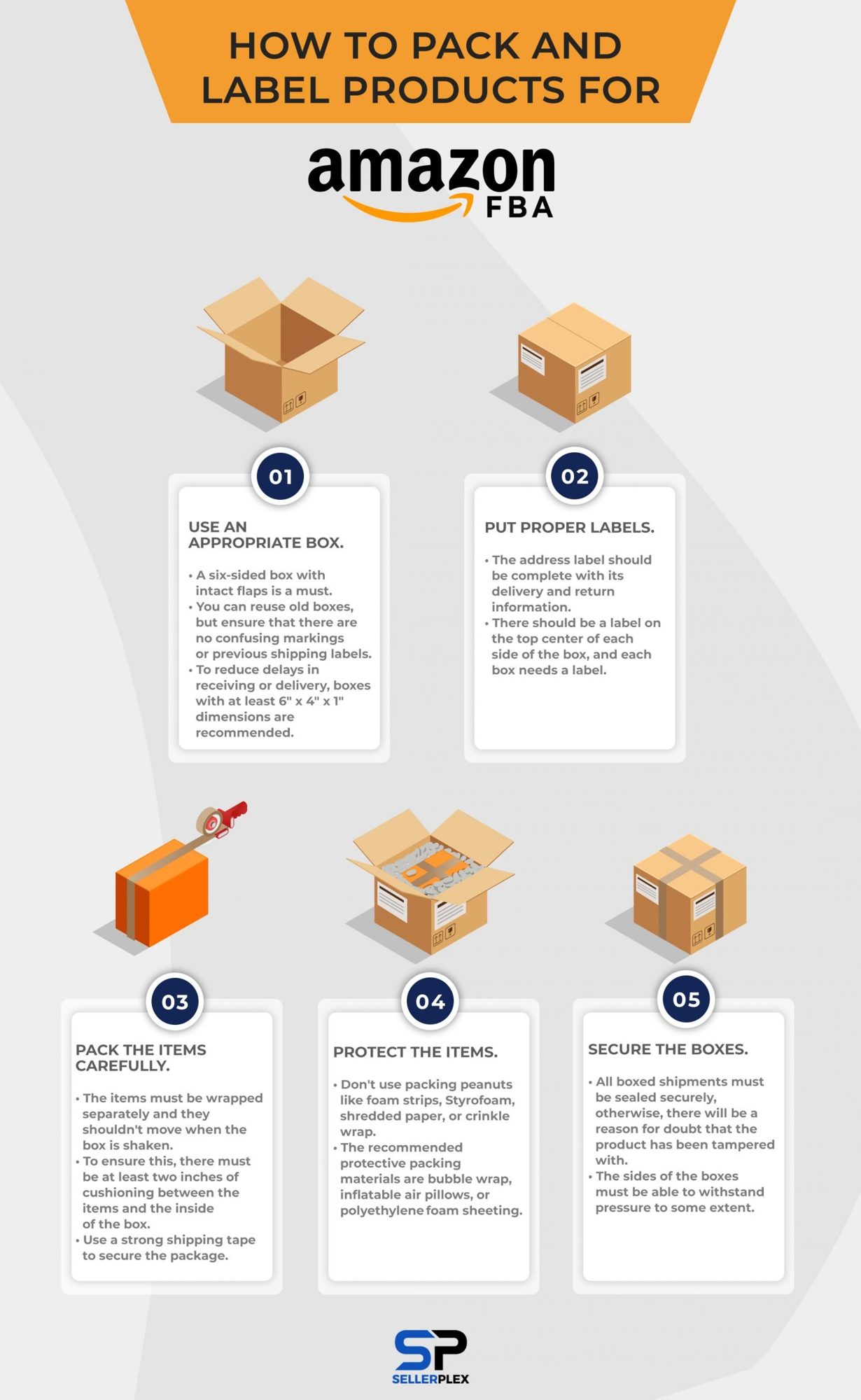
Certain rules must be followed for product shipments in Amazon. These packing requirements are in place to ensure that the products are carefully stored.
- Use an appropriate box.
When shipping to Amazon FBA, you must use a six-sided box with intact flaps. While you can reuse old boxes, ensure there are no previous shipping labels or confusing markings left on the box. Amazon recommends using boxes with dimensions of at least 6" x 4" x 1" for best results. - Put proper labels.
Each box must have a clear and accurate shipping label with complete delivery and return information, placed at the top center of the box. Additionally, you'll need to follow Amazon's specific FBA label requirements to avoid delays in processing your shipment. - Pack the items carefully.
Your products must be individually wrapped and packed to prevent them from moving during transit. To protect the products, use at least two inches of cushioning, such as bubble wrap or air pillows, between the items and the inside of the box. - Protect the items.
Amazon requires specific protective materials, such as bubble wrap, inflatable air pillows, or polyethylene foam sheeting. Avoid using foam strips, packing peanuts, Styrofoam, shredded paper, or crinkle wrap, as these do not meet Amazon's guidelines. - Secure the boxes
Ensure that all boxes are sealed tightly, with sturdy sides that can withstand pressure during transport. This will prevent tampering and provide an added layer of protection for your shipped products.
How to Print Amazon FBA Labels
Labeling packages and products correctly is essential, not to mention it also saves time and money. Incorrect labels might cause delays and even additional fees in the Amazon warehouse.
The Amazon FBA system on your seller account will create labels for the shipment.
Individual products must be labelled with their own barcodes. The same goes for boxes, and there should be no other barcodes aside from that one.
People often wonder how to print Amazon FBA shipping labels, and what they need to remember is that these labels shouldn't fade, otherwise it may cause problems. To make sure that doesn’t happen, simply print the barcode labels with laser-jet printers.
Note that 15-30 kg boxes should also be labeled as "heavy-weight" and this should be seen from any angle of the box.
Polybags can also be used to protect products, but they have specific label requirements as well. Those with at least a 5-inch opening should warn for possible suffocation. It is a strict regulation that might risk the need for product repackaging if not done correctly. Babies and children might mistake the plastic bag as a toy, which can be dangerous.
Labels also have a corresponding requirement for the point size:
- For a bag less than 29 inches, the print size should be at least 10 point.
- For 30-39 inches, the print size must be at least 14 point.
- For 40-59-inch bags, at least 18 point is required.
- For bags sized 60 inches or more, the print size should be at least 24 point.
Shipping Methods to Amazon FBA
Amazon Partnered Carrier vs. Third-Party Shipping
Amazon provides two main shipping options for FBA sellers: Amazon Partnered Carrier and Third-Party Shipping. Using Amazon's partnered carriers often results in discounted shipping rates, especially for domestic shipments within the US.
- Benefits of Using Amazon Partnered Carrier
By utilizing Amazon's partnered carrier services, you can take advantage of negotiated shipping rates that are typically lower than using a third-party carrier. This can help keep your shipping costs down and improve your overall profitability.
How to Send Products to Amazon FBA
The process of sending products to Amazon FBA varies depending on your location. For domestic shipments within the US, you can take advantage of Amazon's partnered carrier services or use a third-party shipping provider. For international sellers, options include air express, air freight, and sea freight.
- Local Shipping (Within the US)
If you're shipping within the United States, you can often find cost-effective shipping options by using Amazon's partnered carrier services. Smaller, lightweight items may cost around $8 to ship, while larger items could cost up to $16, depending on the weight and dimensions. - International Shipping (From China and Other Countries)
For international sellers, especially those shipping from countries like China, there are several shipping options available, including air express, air freight, and sea freight. Using a professional FBA shipping company that offers Delivered Duty Paid (DDP) services can simplify the process. - Air and Sea Freight Options
Air express shipping with carriers like UPS, DHL, or FedEx is the fastest option for international shipments, but it can also be more expensive. Air freight and sea freight are slower but typically more cost-effective for larger shipments.
How Much Does it Cost to Ship to Amazon FBA?
Shipping Costs for Domestic Shipments
Shipping costs for FBA products within the US can range from around $8 for smaller, lightweight items to $16 or more for larger, heavier shipments. The exact cost will depend on the weight, dimensions, and distance to the fulfillment center.
Shipping Costs for International Shipments
International shipping costs are generally higher than domestic shipping, especially for air express services. Using air freight or sea freight options can help reduce the overall shipping costs for larger shipments from countries like China.
Factors Affecting Shipping Costs (Weight, Dimensions, Distance)
The key factors that influence shipping costs to Amazon FBA include the weight and dimensions of your products, as well as the distance from your location to the fulfillment center. Heavier, bulkier items and longer shipping distances will result in higher costs.
Where to Ship Your Amazon FBA Shipment?
Amazon operates a vast network of over 175 fulfillment centers worldwide, most located in North America and Europe. When you create a shipping plan in Seller Central, Amazon's system automatically recommends the appropriate fulfillment center(s) to send your products to.
- Using the Inventory Placement Option
Amazon offers an Inventory Placement option that allows you to ship all your products to a single fulfillment center. This can help reduce shipping costs compared to sending multiple smaller shipments to different locations.
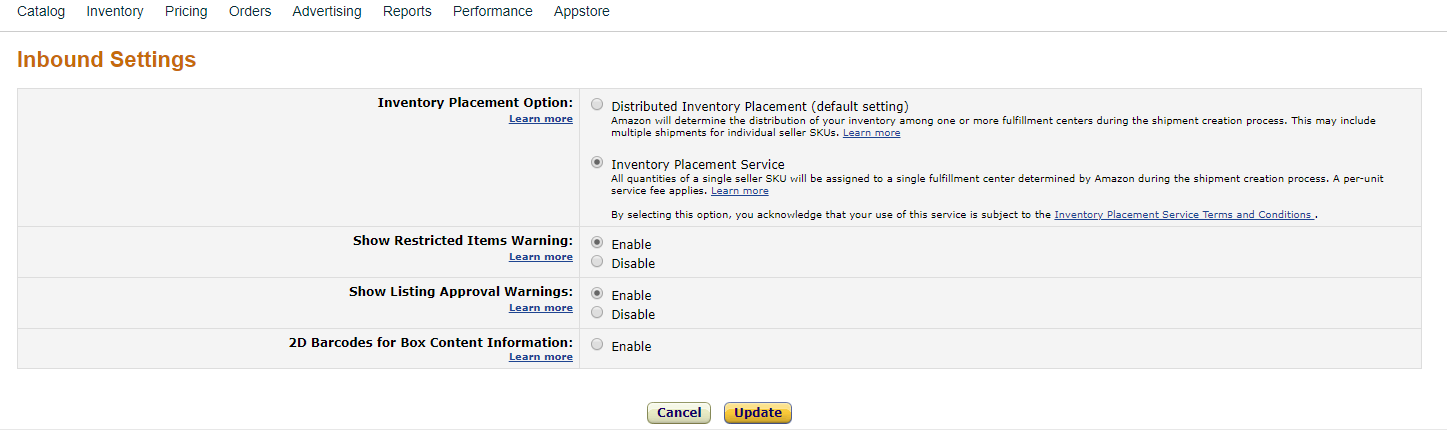
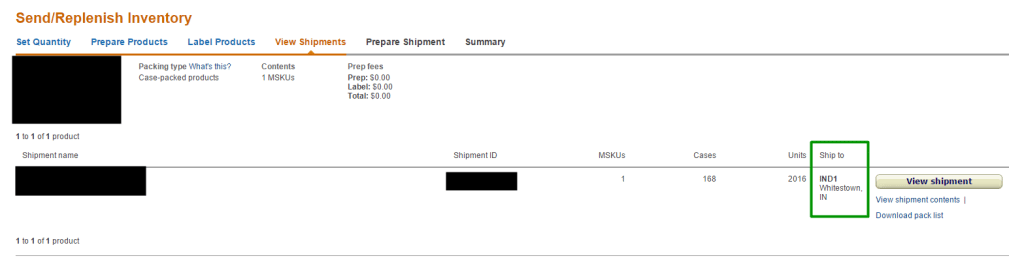
After confirming that the selection has been updated, the Amazon Sellers Account will indicate where the products are being sent, and it will be specific to one fulfillment center only.
How Long Does It Take Amazon to Process an FBA Shipment?
Average Processing Time for Shipments
Once your products arrive at an Amazon fulfillment center, it typically takes 2-6 days for the items to be processed and made available for sale. During peak seasons, such as the holidays, processing times may be slightly longer.
Seasonal Delays and Shipping Queue Tracking
To stay informed on the status of your shipment, you can track it in the Shipping Queue within your Seller Central account. This will show when the delivery was made and when your inventory is fully received and ready for sale.
Inventory Management Tips for FBA Sellers
Avoiding Long-Term Storage Fees
Proper inventory management is crucial to avoid incurring long-term storage fees from Amazon. They charge additional fees for products stored for more than 365 days, so keeping your inventory moving and selling through your products efficiently is essential.
Monitoring Inventory Levels Using Seller Central
Amazon's Seller Central platform provides tools to help you monitor your FBA inventory levels and avoid stockouts. Regularly reviewing your inventory and sales data can help you decide when to send additional shipments to the fulfillment centers.
Maximizing Profits with FBA
Choosing High-Demand, Low-Storage Products
One strategy to maximize profitability with Amazon FBA is to focus on products that are in high demand but don't require a lot of storage space. Larger, bulkier items may incur higher storage fees, especially during peak seasons, while smaller, lightweight products can be stored more efficiently and often have higher inventory turnover.
Optimizing Pricing Strategy
Carefully managing your pricing is crucial to ensuring profitability. Use tools like Amazon's Automate Pricing to adjust your prices based on competition, but don't simply undercut the market. Maintain healthy profit margins that cover all associated costs, including FBA fees, shipping, and storage.
Common Mistakes to Avoid When Shipping to FBA
Labeling Errors
One of the most common mistakes when shipping to Amazon FBA is improper labeling. Ensure that each of your products has a scannable barcode that meets Amazon's requirements. Incorrect or missing labels can lead to delays, additional fees, and processing issues at the fulfillment centers.
Underestimating Shipping Costs
Accurately calculating your shipping costs is essential to maintaining profitability. Underestimating these costs can result in unexpected expenses and eat into your margins. Take the time to research and factor in all relevant shipping fees, including Amazon's partnered carrier rates or third-party shipping options.
Improper Packaging
Failing to pack your products according to Amazon's guidelines can lead to damage during transit, which may result in returns, negative customer reviews, and account health issues. Follow the packing instructions carefully, using the appropriate cushioning materials and securely sealing the boxes.
Handling Returns and Customer Service

How Amazon Manages Returns
One of the key benefits of using Amazon FBA is that they handle the returns process on your behalf. When a customer requests a return, Amazon will process it directly. If the item is eligible for resale, it will be restocked in your inventory. If the product is damaged or unsellable, Amazon will notify you and remove it from your sellable inventory.
FBA Seller Responsibilities
While Amazon takes care of most customer service tasks, you still need to manage several responsibilities as an FBA seller. This includes ensuring your product listings are accurate, responding promptly to customer inquiries, and monitoring your account health metrics in Seller Central.
FAQs About Shipping to Amazon FBA
1. How do I find the closest Amazon fulfillment center?
You can find the closest Amazon fulfillment center by using the Seller Central dashboard. Amazon will automatically assign a fulfillment center when you create your shipping plan, but you can also search for "Amazon facilities near me" to identify nearby locations.
2. How much is Amazon shipping for FBA sellers?
Shipping costs for Amazon FBA sellers can vary, but using Amazon's partnered carrier services often results in lower rates, especially for domestic shipments within the US. Smaller items may cost around $8 to ship, while larger products could cost up to $16 or more, depending on the weight and dimensions.
3. Can I drop off my products at an Amazon store?
No, Amazon does not allow sellers to drop off products directly at their fulfillment centers . You must ship your inventory through carriers like UPS or FedEx. However, you may be able to use Amazon drop off points for smaller shipments if there's a nearby location.
4. How does Amazon handle damaged goods?
If your products are damaged during the fulfillment process, Amazon may reimburse you for the loss. If a customer receives a damaged item and requests a return, Amazon will handle the return process and restock the item in your inventory if it's resellable.
5. What are FBA fees?
FBA fees include the costs for storage, order fulfillment, and shipping. These fees are based on the size and weight of your products, as well as the duration of storage. Carefully accounting for FBA fees in your pricing strategy is crucial to maintaining profitability.
Now That You Know About Shipping to Amazon FBA, What’s Next?
Shipping your products to Amazon FBA is just the beginning. Once your products are in Amazon's hands, it’s crucial to manage every aspect of your business to ensure growth and long-term success. This is where SellerPlex can help. As a full-service Amazon agency, we partner with e-commerce businesses like yours to streamline operations, boost sales, and drive growth.
Partner with SellerPlex for Amazon Success
At SellerPlex, we specialize in helping e-commerce brands scale efficiently. Here are some of the services we provide to support and enhance your Amazon business:
- Account Management: From handling daily tasks to resolving complex listing issues, our team keeps your Amazon account running smoothly, allowing you to focus on strategy.
- Supply Chain Management: We make sure you never run out of stock. Our supply chain experts coordinate inventory planning, supplier relationships, and logistics to ensure that your products are always available to meet customer demand.
- Content Optimization: Great content is essential for standing out on Amazon. Our team optimizes product listings with compelling descriptions, images, and keywords to help you attract more customers and improve conversion rates.
- PPC Advertising and Marketing: SellerPlex offers advanced pay-per-click (PPC) management and other marketing services to increase visibility and sales. We create, monitor, and adjust campaigns to maximize your return on investment.
- Financial Management: Maintaining clean and complete financials is essential for business growth. Our finance team provides accurate bookkeeping, expense tracking, and profit analysis so you can make data-driven decisions.
Let SellerPlex Take Care of the Rest
Becoming a SellerPlex partner means having an experienced team of e-commerce professionals on your side, dedicated to helping you achieve your Amazon goals. With our expertise, you can confidently scale your business, knowing that we’ll manage the details and optimize your operations every step of the way.
Ready to take your Amazon business to the next level? Contact SellerPlex today to learn how our tailored Amazon services can support your brand’s growth and success.
Insert Image
Amazon supply chain management →
Inventory planning, freight and 3PL coordination from factory to FBA, so stockouts stop costing you sales.
Want more of this in your Google results? Add SellerPlex as a preferred source.